Rapid Friday Sale is Live!
Get exclusive discounts on all products

So, what exactly is a React Native UI library?
Think of it as a professional-grade toolkit for building your app's interface. Instead of having to craft every single button, form, and navigation bar from scratch, you get a pre-built collection of high-quality components ready to drop right into your project. It's the difference between a carpenter making their own nails and screws versus having a box of reliable, perfectly-made ones on hand.
Staring at a blank screen on a new mobile app project can be daunting. You're responsible for designing, coding, and then rigorously testing every visual element. This isn't just a massive time sink; it's also a recipe for tiny inconsistencies that can make an app feel cheap or unprofessional, especially when you're trying to make it look and feel native on both iOS and Android.
This is precisely where a React Native UI library comes in to save the day. It provides a solid foundation of standardized, reliable components that take care of the visual layer for you. You get to stop reinventing the wheel and start focusing your brainpower on what actually makes your app special—its core features and business logic.
The single biggest win you get from a UI library is a massive boost in development speed. Building common components from the ground up can easily burn through days, sometimes even weeks. With a library, you can pop in a fully functional, beautifully designed component in a matter of minutes.
This speed-up directly translates to hitting your deadlines and staying on budget. For startups or small teams, this is huge. It means you can get a polished Minimum Viable Product (MVP) out the door faster and with a much smaller investment, letting you test your ideas in the real world without getting stuck in the weeds of pixel-perfect styling.
A cohesive design is non-negotiable for a professional-feeling app. A good UI library enforces that visual consistency from the start, providing components that all speak the same design language. Every button, card, and input field will instantly look like it belongs.
This consistency naturally extends across platforms. A well-built React Native UI library makes sure your components respect the design conventions of both iOS and Android, creating an experience that feels intuitive and familiar to everyone, no matter what device they’re using.
A UI library isn't just a folder of code snippets; it's a productivity multiplier. It shifts the development process from the painstaking craft of laying individual bricks to the strategic assembly of pre-fabricated walls. You get to build a better house, faster.
While UI libraries are a fantastic shortcut for faster development, they work even better when you understand broader general developer productivity strategies. When you pair a solid component foundation with smart workflows, you create a system where building top-tier apps becomes a repeatable, scalable process.
At the end of the day, a quality React Native UI library delivers three core benefits that are impossible to ignore:
By bringing a UI library into your project, you aren't just picking a tool. You're making a strategic decision to build better apps, more efficiently. It's a foundational choice that pays off over and over again throughout the entire life of your project.
Picking a React Native UI library is a huge decision, and it goes way beyond just finding a few slick-looking buttons. Think of it as choosing a foundational partner for your app. The right library will seriously speed up your development, but the wrong one can quickly become a tangled mess of technical debt and endless headaches.
Let’s break down what really matters so you have a solid framework for making your choice. A good library isn't just a collection of components; it's a complete system for building, styling, and maintaining your app's entire interface. It’s the difference between getting a random box of Legos and a full-on Lego Technic set with instructions and all the specialized pieces you need to build something amazing and scalable.
First thing's first: what components are actually in the box? A library with only the basics—like buttons and text inputs—isn’t going to cut it. You’ll end up building all the complex stuff like date pickers, modals, or bottom sheets from scratch, which completely defeats the purpose.
You need a collection that’s both deep and wide:
A truly great React Native UI library feels like a natural extension of the core framework. Its components should be intuitive to use, easy to customize, and powerful enough to handle real-world application demands without requiring awkward workarounds.
Every library has a philosophy on styling, and you need to find one that matches your own. Some libraries come with a very opinionated design system (like Material Design), which is awesome for getting up and running fast but can feel restrictive. Others offer a more "headless" or utility-first approach, giving you total control over the look and feel.
Pay close attention to how the library handles theming. Can you set up global tokens for colors, spacing, and fonts that apply to every component? This is a non-negotiable for keeping your brand consistent and for easily adding features like a dark mode. Libraries that play well with styling engines like NativeWind are a game-changer here. For a deeper dive, check out our guide on using Tailwind CSS in React Native.
Let's be real: not all components are created equal. A poorly optimized component can kill your app's performance, leaving users with a laggy, frustrating experience. Dig into whether the library was built with performance in mind. Are components memoized? Do they avoid unnecessary re-renders? What’s the impact on your final bundle size?
Accessibility is just as important. When you’re looking at libraries, you absolutely have to consider how they align with the foundational principles of accessibility to make sure your app is usable by everyone. This means components should come with proper ARIA labels, roles, and states baked right in, making your app inclusive from the start.
Finally, never, ever underestimate the power of great documentation and an active community. A library can have the best features in the world, but if the docs are confusing or incomplete, you'll burn hours on trial and error. Look for clear, comprehensive guides with interactive examples and a solid API reference.
The community is your lifeline when you inevitably get stuck. An active GitHub repo, a buzzing Discord server, or a healthy number of Stack Overflow questions are all great signs. It tells you the library is being maintained and that you can get help when you need it. This is especially true for the startups and small teams who love React Native. In fact, roughly 72% of companies using React Native report annual revenues under $50 million, and about 50% have fewer than 50 employees—these teams need solutions that just work.
Choosing a React Native UI library isn’t like picking a color for a button. It's more like choosing the engine for your car. The right choice powers your project forward, making the journey smooth and efficient. The wrong one can lead to constant breakdowns, performance issues, and frustrating roadblocks that slow your team to a crawl.
The goal here is to find a library that slots perfectly into your project's specific needs, plays to your team's existing skills, and supports your long-term vision. This means you need to look past the flashy component demos and really dig into the technical details that will shape your day-to-day workflow. It's about asking the right questions upfront to ensure the library you pick is a true partner, not just a temporary fix.
Before you even think about aesthetics, you have to nail down the technical compatibility. This is the absolute first, non-negotiable step. A library that conflicts with your core tooling is a non-starter, no matter how beautiful its components are. Get this wrong, and you're signing up for a world of hurt.
Start with the bedrock of your development environment:
To make this easier, here's a quick checklist you can run through when evaluating a new library.
| Compatibility Factor | What to Check | Why It Matters |
|---|---|---|
| Expo Workflow | Does it work with Expo Go? Does it require a custom dev client? | Seamless Expo Go support drastically speeds up development and testing cycles. |
| TypeScript | Are types included? Are they accurate and regularly updated? | Strong typing catches bugs early and improves developer experience. |
| React Native Version | Is it compatible with the latest RN versions? Check the peerDependencies. |
Avoids breaking changes and ensures access to new framework features. |
| Key Dependencies | Does it rely on other libraries (e.g., react-native-reanimated)? |
Ensures you don't introduce conflicting or outdated dependencies into your project. |
| Web Support | If you need web, does it support react-native-web effectively? |
Crucial for cross-platform apps targeting web alongside iOS and Android. |
Running through these points before you commit will save you from nasty surprises down the road.
Every UI library has its own personality when it comes to styling. This choice will fundamentally shape how you build and maintain your app's visual identity. Some libraries are highly opinionated, handing you a complete design system like Material Design on a platter—great for speed. Others give you a more "headless" or unstyled foundation, which means total creative control.
Choosing a styling philosophy is about balancing speed with control. An opinionated library gets you to a professional-looking MVP faster, while a headless or utility-first library gives you the flexibility to build a truly unique, bespoke brand experience.
Think about what your project really needs:
This flowchart breaks down the key decision points you'll face, from evaluating core components to theming capabilities and community support.
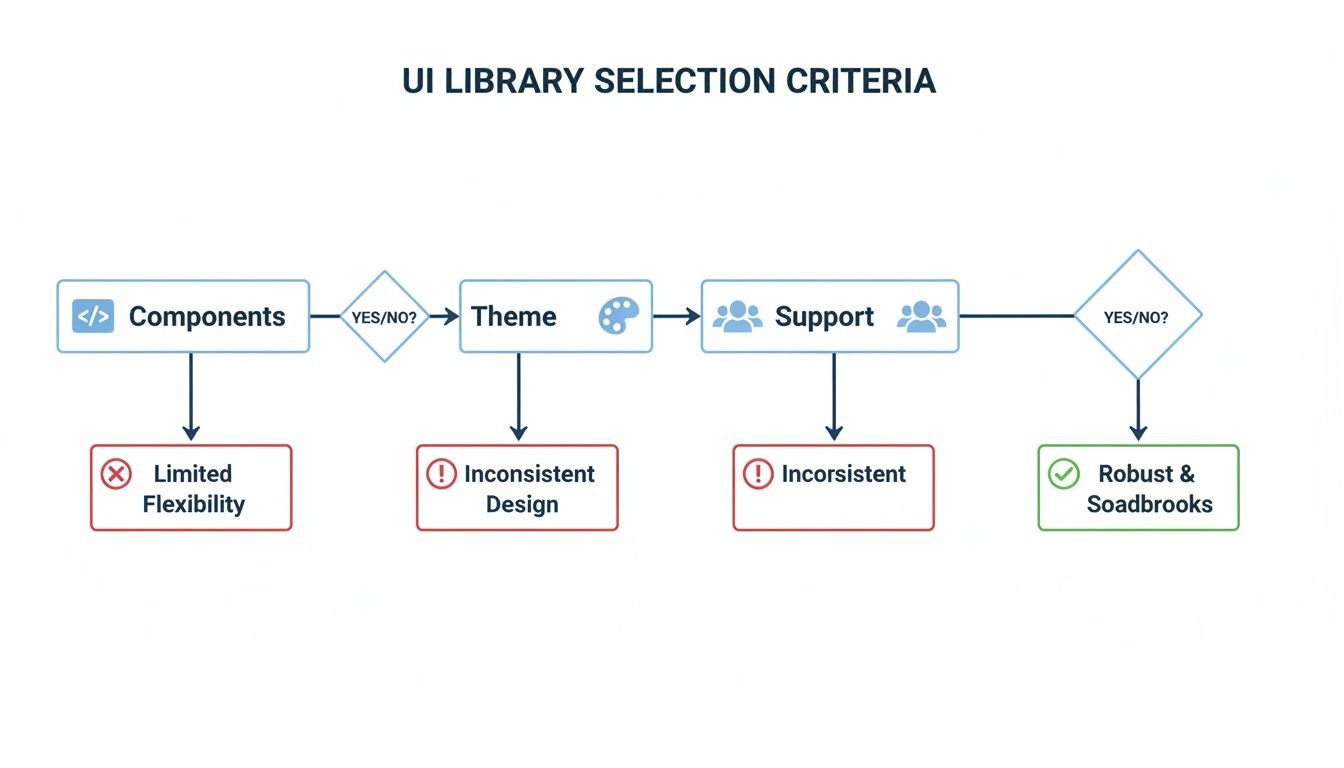
As you can see, a library's real value is a mix of its technical features, its aesthetic flexibility, and the strength of its ecosystem.
Finally, take a hard look at the library's overall health and where it's headed. Picking a UI library is a long-term commitment. You don’t want to build your app on a foundation that’s about to crumble. A little due diligence now can save you from a major migration headache later.
Look for these signs of a healthy, thriving project:
By carefully weighing these factors—compatibility, styling, and community—you can confidently choose the perfect React Native UI library that will actually help your team build amazing apps, not hold them back.

Okay, now that we know what to look for in a UI library, let's dive into some of the heavy hitters in the React Native world. The community is constantly building, and the quality of the tools we have access to is seriously impressive.
It’s not really a surprise when you think about it. Core packages like react see over 20 million npm downloads every single week. That creates a massive wave of innovation that every React Native UI library gets to ride. The best ones have huge followings—we're talking tens of thousands of GitHub stars—which is a great sign of community trust and ongoing support.
Let’s get into the philosophy behind a few standout libraries. Matching their strengths to your project’s goals is the key to making the right choice.
React Native Elements holds a special place in the community. It’s one of the oldest and most trusted libraries out there, and its philosophy is beautifully simple: give developers a solid, unopinionated set of components they can easily shape to fit their brand.
Unlike libraries that box you into a specific design system, Elements provides a more general-purpose structure. You get total control over the look and feel, combining its props with the standard React Native APIs you already know. It’s perfect if you want to skip writing boilerplate but don’t want to be locked into an aesthetic like Material Design.
ThemeProvider, but you’ll be defining your themes from the ground up.If your goal is an app that looks and feels like it belongs on Android, strictly following Google's Material Design guidelines, then React Native Paper is your answer. It's maintained by Callstack, a major player in the React Native ecosystem, so you know it's polished and production-ready.
Paper is all about creating a cohesive, familiar user experience with minimal fuss. It comes with light and dark themes baked right in, making it a breeze to add one of today’s most requested features. The components are built to work together flawlessly, giving you a consistent look across the entire app.
React Native Paper is the fastest path to a polished, Material Design-compliant application. It prioritizes consistency and platform adherence, making it an ideal choice for projects that need to feel native to the Android ecosystem right out of the box.
As a nice bonus, the library includes a Babel plugin that automatically strips out any components you don’t use, shrinking your final bundle size. That’s a great touch for anyone focused on performance.
UI Kitten is built around the Eva Design System, and its entire mission is powerful, scalable theming. If you need to create and maintain a consistent visual identity across your app without pulling your hair out, this is the one.
It ships with solid light and dark themes, but its real magic is how easily you can create new themes to match your brand’s unique style. For any project with complex branding requirements or the need to switch between multiple visual styles, UI Kitten is a fantastic choice.
Another huge win is its first-class support for right-to-left (RTL) languages. If you're building a global app, this is a massive time-saver. All its components are designed to work perfectly in RTL layouts from the get-go.
For years, NativeBase was the go-to for tons of developers, loved for its huge component library and how easy it was to get started. It has since evolved into gluestack-ui, a more modern, performance-first library built with a utility-first mindset.
The philosophy behind gluestack-ui is all about flexibility and speed, using an approach that feels a lot like Tailwind CSS. This makes it a dream for developers who love the utility-first workflow that’s so popular on the web. The components come unstyled by default, giving you absolute control over how they look.
Ultimately, picking between these top-tier libraries comes down to your project's DNA. Whether you need total creative freedom, strict adherence to a design system, or powerful theming, there’s a React Native UI library out there ready to help you build faster and better.
Alright, you've done the hard work and picked the perfect React Native UI library for your project. Now for the fun part: bringing it to life in your codebase. This is where your app's personality really starts to shine.
Getting it integrated isn’t just about running an installation command. It’s about thoughtfully weaving the library into your project so it can scale without giving you headaches down the road.
The initial setup is usually a breeze—a couple of commands, and the library is in your package.json. Most modern libraries have fantastic documentation that will guide you through adding any extras you might need, like react-native-vector-icons or react-native-svg.
But the real magic happens right after the install. Your first and most critical move is to set up a global theme provider. This little component is the command center for your app's entire look and feel.
Think of a theme provider as a wrapper that sits at the very top of your application. It’s responsible for injecting your design tokens—your brand's specific colors, fonts, and spacing rules—into every single component from the UI library. This is the secret sauce to getting a consistent look without manually styling every button, card, and input field.
It's like setting the design rules of the game from the start. Instead of peppering a hex code like #3B82F6 all over your code, you define it once as primary in your theme. From then on, any component can just ask for the "primary" color, keeping everything on-brand and making future redesigns a walk in the park.
A well-structured theme is the cornerstone of a scalable UI. It turns brand guidelines into actionable code, allowing you to update your app's entire color palette or typography by changing just a few lines in a single file.
Your theme configuration will typically handle things like:
primary, secondary, background, errorfontSizes, fontWeights, lineHeightsmargin and paddingradii for rounded corners and borderWidthsNailing this setup on day one is a massive win for the long-term health of your project.
While a great React Native UI library gives you an incredible head start, you’ll always need to craft components unique to your app. But don't start from scratch! The smart move is to build on top of the library's solid foundation.
This is where "wrapper" components come in. For example, instead of using the library's <Button> directly everywhere, you create your own <AppButton>. This new component imports the library's button and pre-configures it with your app-specific styles and logic.
This approach pays off in a few huge ways:
<AppButton> file. One change, and it's done.This practice of wrapping and extending is actually the first step toward building your very own React Native design system—an essential tool for any serious application.
For teams that need to ship fast, templates and UI kits are a total game-changer. Kits like the ones we offer at theappmarket don't just give you buttons and inputs; they provide entire screens and navigation flows built with battle-tested libraries like gluestack-ui and NativeWind.
You get fully functional, production-ready screens for things like authentication, user profiles, and settings pages right out of the box. This can literally save you hundreds of hours of development time.
Instead of getting bogged down in layout work, you can jump straight into building the features that make your app special. These templates are the ultimate accelerator, giving you a high-quality, scalable foundation from the moment you start your project.
The world of React Native is always moving, and that’s a good thing. As we look down the road, a few key trends are popping up that change how we think about building user interfaces. Picking the right React Native UI library isn't just about what works now; it's about choosing a tool that's ready for what's next.
One of the biggest shifts we're seeing is the move toward utility-first styling. Think Tailwind CSS. More and more libraries are offering unstyled, highly composable components that hand you complete control over the design. It's a departure from the old way of using rigid, pre-made themes and a big step toward true design flexibility and brand consistency.
Of course, performance is still king. There's a relentless push to make apps smaller, faster, and smoother. As user expectations climb, UI libraries are being re-engineered from the ground up to be lighter and more efficient. The goal is to deliver that buttery-smooth, native feel without sacrificing features, which is absolutely critical to keeping users happy.
This push for better tools is also fueled by some healthy competition. React Native isn't the only game in town, and other frameworks are constantly innovating, which forces the entire ecosystem to get better.
Choosing a React Native UI library isn't just about the components you get today. It’s about buying into a philosophy that sees where the puck is going—toward utility-first styling, top-tier performance, and the agility to stay ahead in a crowded market.
You can see this competition playing out in the numbers. Between 2022 and 2024, the slice of new apps built with React Native grew from 4.73% to about 6.75%. That's solid growth, but it also shows there's a real fight for developer attention, with frameworks like Flutter also gaining a strong foothold. This cross-platform market analysis breaks it down nicely.
At the end of the day, picking a library is a long-term bet on your development workflow and, ultimately, your app's success.
Alright, let's tackle some of the common questions that pop up when you're deciding on a React Native UI library. Getting these sorted out early can save you a ton of headaches down the road and give you the confidence to pick the right tool for the job.
This is probably the number one concern, and it's a fair one. The short answer? A well-chosen, modern library won't make a noticeable difference. They're built with performance in mind.
Most top-tier libraries use smart techniques like tree-shaking, which automatically strips out any components you don't use from the final app bundle. This keeps things lean. Of course, a poorly built library or misusing a good one can cause performance hiccups. Always check that the library you're considering is optimized, has a small footprint, and follows best practices like memoization to avoid pointless re-renders.
This is a big one. You need a library that works with your brand, not against it. The ease of customization really depends on the library's philosophy.
A great library shouldn't lock you in. It should give you a powerful head start. You want the freedom to override styles, add your own logic, and build a distinct look without constantly fighting the framework.
Keeping your dependencies current is key for security and getting new features, but updates can sometimes feel like you're defusing a bomb. A little discipline goes a long way here.
Following these steps turns a potentially stressful process into a routine part of maintenance, letting you get the benefits of new versions without derailing your project.
Ready to skip the boilerplate and launch faster? Explore production-ready templates and UI kits from theappmarket that give you a massive head start on your next project. Check out our catalog at https://theappmarket.io.
Dec 13, 2025

4 min read
Learn how to change app name in React Native and Expo. Our guide covers display names, bundle IDs, and store listings for iOS and Android projects.

Dec 12, 2025
4 min read
Discover the best React Native component library for your next project. We compare top libraries on performance, customization, and real-world use cases.
Dec 11, 2025
4 min read
Discover how to choose the right React Native UI kit. This guide covers top kits, selection criteria, and customization to accelerate your app development.

Dec 10, 2025
4 min read
Explore our in-depth guide to find the best React Native UI library. We compare top contenders to help you choose the right fit for your project.

Dec 09, 2025
4 min read
Discover a practical approach to building apps with React Native. This guide covers setup, UI, state management, and testing to help you ship great apps.

Dec 08, 2025
4 min read
android login with facebook: Learn to set up the Facebook SDK, manage tokens, and implement secure authentication across native Android, cross-platform apps.

Dec 07, 2025
4 min read
Master the alert in React Native. Learn to handle platform differences, build custom modals, and apply best practices for a seamless user experience.
Dec 06, 2025
4 min read
keyboardavoidingview react native: Master keyboard handling with KeyboardAvoidingView across iOS, Android, Expo, and TypeScript.

Dec 05, 2025
4 min read
A practical guide to implementing a React Native PDF viewer. Learn to compare libraries, handle native setup, and troubleshoot common issues with real code.

Dec 04, 2025
4 min read
how to validate startup idea: learn proven methods like customer interviews, MVPs, and metrics to confirm market fit.

Dec 03, 2025
4 min read
how to make app like uber: Learn core features, tech stack, development steps, testing, and launch tips.

Dec 02, 2025
4 min read
Build a rock-solid React Native setup. This guide covers Expo vs. Bare workflows, TypeScript, pnpm monorepos, NativeWind, and deployment strategies.

Dec 01, 2025
4 min read
A practical guide to Stripe React Native integration. Learn to set up your server, build payment UIs, handle webhooks, and launch secure mobile payments.

Nov 30, 2025
4 min read
Learn how to master push notifications in React Native. This guide covers setup, best practices, and advanced techniques for engaging your users.

Nov 29, 2025
4 min read
Build powerful location-based apps with our practical guide to react native with google maps. Get setup guides, pro tips, and best practices for iOS & Android.

Nov 28, 2025
4 min read
Explore deep linking react native with a practical guide to configuring URL schemes, universal links, navigation, and testing for Expo and bare apps.

Nov 28, 2025
4 min read
A practical guide to building a scalable React Native design system. Learn to implement tokens, theming, and tools like NativeWind and gluestack-ui.
Nov 26, 2025
4 min read
Learn why react native expo templates speed up your projects with ready-made patterns and practical tips.

Nov 25, 2025
4 min read
Discover how to improve developer productivity with actionable strategies for workflow, tooling, and culture. A practical guide for software engineering teams.

Nov 24, 2025
4 min read
Discover the best cross platform app development tools. Compare top frameworks like Flutter and React Native to build and ship apps faster.
Nov 23, 2025
4 min read
This Expo React Native tutorial provides a hands-on guide to building cross-platform apps. Learn setup, styling with NativeWind, navigation, and deployment.
Nov 22, 2025
4 min read
Build beautiful UIs faster with this guide to Tailwind CSS React Native. Learn setup, styling, and advanced techniques with NativeWind for mobile apps.

Nov 21, 2025
4 min read
Explore our curated list of 7 top-tier React Native app examples. Discover production-ready templates and resources to build your next app faster.
Mar 19, 2025
4 min read
theappmarket offers React Native UI templates to accelerate development. Get customizable, production-ready React Native app templates and Ui kit, some free. Build faster & smarter today!



